
Pulsz Mobile App
Take your favorite social casino games with you. Pulsz works on iPhone, iPad, Android phones, and mobile browsers, so you don't need a separate download.
Download the App
You can grab the Pulsz app from the App Store if you're on iOS, or from Google Play if you're on Android. Just search for "Pulsz" and install the official one. Check that you have enough storage and a solid internet connection first.
If the app doesn't show up in your region, you can still play on the mobile website. The mobile site has almost the same games and features.
Mobile Browser Play
Not in the mood to download an app? Open puls.com in your mobile browser. The site responds to whatever screen size you're using. You can log in, grab daily rewards, play games, and manage your account without installing a thing.
Browser play comes in handy if you jump between devices or just want to save storage space. Add a bookmark or a home-screen shortcut and it feels pretty close to a native app.
Game Selection on Mobile
Most slots and scratchcards you see on desktop are on mobile too. New releases tend to be mobile-ready from launch. Table games and specialty titles might differ depending on your device.
Games are built for touchscreens. Tap to spin or swipe through the lobby. Pinch to zoom if you need a closer look.
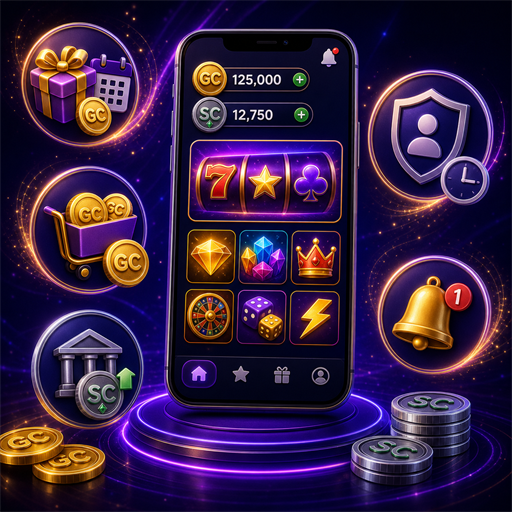
Mobile Features
- Daily login bonuses and promotions.
- Coin store for Gold Coin purchases.
- Sweeps Coins balance and redemption requests.
- Account settings and responsible gaming tools.
- Push notifications for new offers.
System Requirements
| Platform | Minimum Version | Notes |
|---|---|---|
| iOS | iOS 13+ | App Store download |
| Android | Android 8+ | Google Play download |
| Mobile Browser | Current Chrome/Safari | No download required |
Performance and Data Usage
Pulsz games are light on your device, but video slots eat more data than static games. Use Wi-Fi when you can for the smoothest experience. If you're on mobile data, keep an eye on usage so you don't get hit with carrier overage charges.
If a game freezes, close the app and reopen it, or refresh the browser page. Your progress is saved automatically most of the time.
Installation Tips
- Only download from official app stores.
- Enable automatic updates for the latest features.
- Use a strong password and enable device lock.
- Keep your operating system up to date.
Mobile Security
Account security matters just as much on mobile. Pick a unique password and turn on biometric login if your device has it. Don't share your account with anyone, and skip public Wi-Fi when you're buying Gold Coins or requesting redemptions.
Mobile Bonuses
Mobile players get the same daily bonuses and promotions as desktop players. Some limited-time offers show up through push notifications in the app. Turn on notifications if you want to catch those alerts.
Account Sync
Your Pulsz account works across every device. Start playing on your phone and pick up later on your desktop without losing progress. Your coins, rewards, and settings live in your account, not on one device.
Troubleshooting
- App crashes: Update to the latest version or reinstall.
- Games won't load: Clear browser cache or check your connection.
- Login issues: Reset your password or contact support.
- Slow performance: Close background apps and free up memory.
Why Play on Mobile?
Mobile play fits into a short break or a commute just as easily as a relaxed evening. The interface is built for one-handed use, and the game library has enough depth to stay interesting wherever you are.
Tablet Experience
Tablets sit somewhere between a phone and a desktop. The bigger screen makes browsing the lobby easier and games feel more immersive, without giving up mobile portability. Both iPad and Android tablets work through the app or browser.
Mobile vs Desktop
The core experience stays the same across devices. Some older games might not look great on very small screens, but most modern releases do. Desktop suits longer sessions with multiple tabs, and mobile is the better fit for quick, on-the-go play.
Push Notifications
Turn on push notifications so you don't miss daily bonuses or tournament starts, plus new game releases. You can adjust notification settings in the app or your device settings whenever you want.
Accessibility
Mobile settings let you adjust text size and contrast, along with sound. If you need larger buttons or voice commands, or if you use a screen reader, your device's accessibility features can help.
Future Updates
We update the app regularly with new games and performance improvements, plus security patches. Keep automatic updates on so you're always running the latest version.
Mobile Banking
You can buy Gold Coins and request Sweeps Coins redemptions right from the app. Mobile banking uses the same secure payment methods as desktop. Stick to a private Wi-Fi connection for any financial transaction.
Mobile Tournaments
Tournaments work on mobile the same way they do on desktop. Join leaderboard events and track your rank in real time. You can collect prizes without switching devices. Tournament notifications help you catch every start time.
App Permissions
The Pulsz app might ask for permission to send notifications and access storage, plus network access. Those permissions help the app deliver bonuses and save your progress, and they let it load content faster. You can manage them in your device settings.
21+. Pulsz is a social casino with no real-money gambling. Please play responsibly. Set limits, take breaks, and find help at ncpgambling.org, 1-800-GAMBLER, or by calling 1-800-522-4700. Licensed by the Government of Curacao and the Kahnawake Gaming Commission.